Smartlead now shows which warmup pool your mailboxes are using - and how close you are to qualifying for higher-quality pools.
This helps you understand warmup quality, eligibility, and upgrade paths at a glance.
With this update, you can:
View your current warmup pool tier
See clear qualification criteria for higher pools
Track progress toward Ultra Premium Pool
Get upgrade prompts when eligible
Login to your Smartlead account and click on the Email Accounts tab.
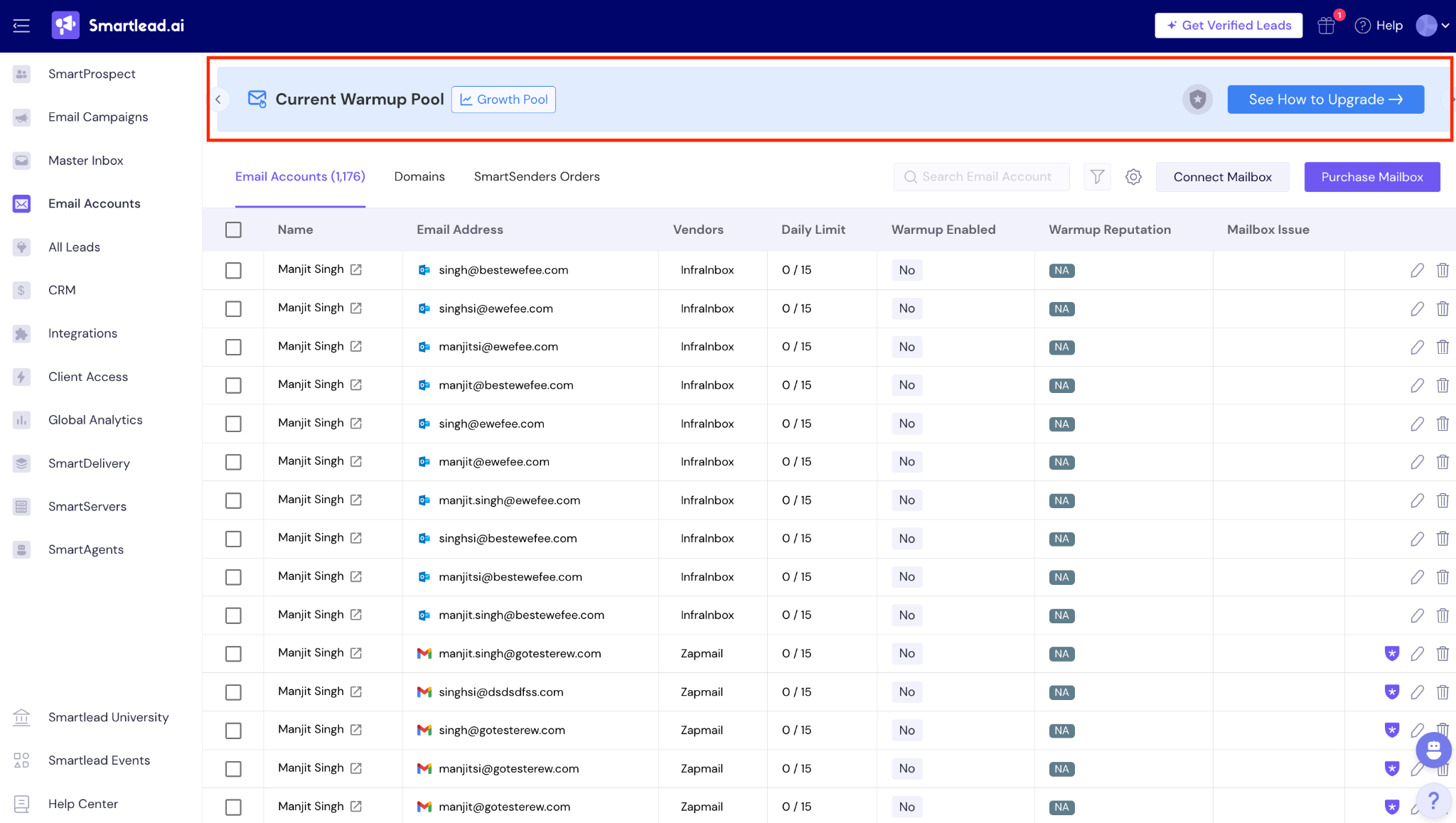
On this page, you will see a banner at the top that shows:
Your current warmup pool
A “See how to upgrade” button (when applicable)
Clicking the banner opens the detailed pool status view.
For example, if you’re on a Growth Pool, you will see the below:
When you click on the “See how to Upgrade” button, you can further see your:
Current pool level
Progress toward the next pool
Qualification status (qualified / not qualified / points away)
Overall pool score (out of 100)
Upgrade CTAs (shown only when relevant)
An example below:
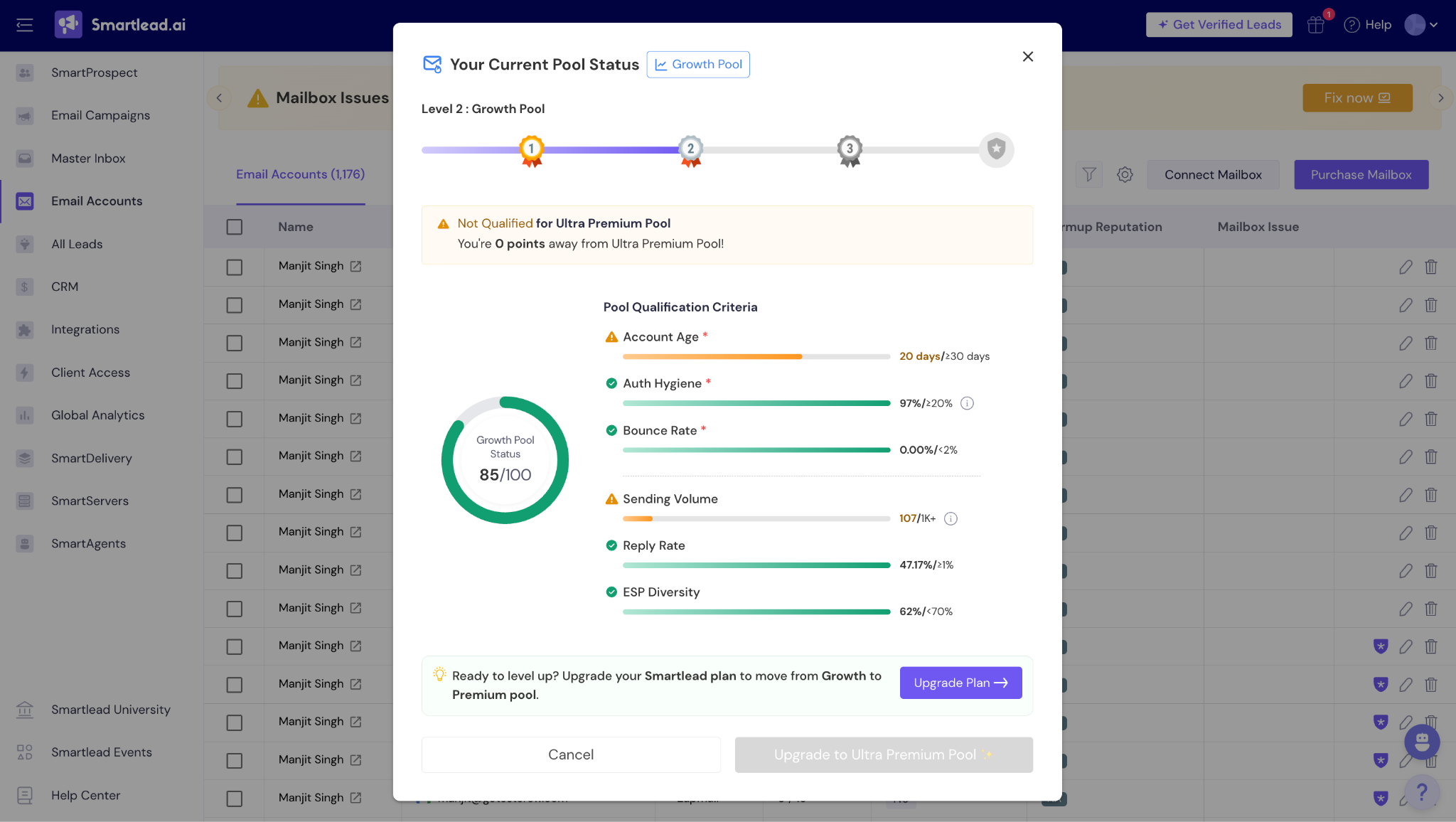
Your pool eligibility is evaluated using:
Account age: Refers to how long a mailbox has been active in Smartlead. Older, consistently warmed mailboxes generally show more stable sending behavior.
Auth hygiene (SPF, DKIM, DMARC): Checks whether your domain and mailbox authentication are correctly set up. Proper authentication helps email providers verify that your emails are legitimate and trusted.
Bounce rate: Measures how many emails fail to reach recipients. Lower bounce rates indicate healthier lists and better sending practices.
Sending volume: Looks at how many emails the mailbox sends over time. Volume is evaluated to ensure it increases in a controlled, warmup-safe manner.
Reply rate: Tracks how often recipients respond to your emails. Higher engagement signals healthier inbox reputation and positive sender behavior.
ESP diversity: Evaluates how well your sending and engagement are distributed across different email service providers (such as Gmail, Outlook, Yahoo). Balanced diversity reduces over-reliance on a single ESP.
Each factor shows:
Your current value
Required benchmark
Visual progress indicator
Smartlead warmup pools are aligned with your plan and mailbox readiness. Each pool supports a different stage of scale and deliverability.
Available on: Base plan
Purpose: Entry-level warmup
Best for: Low-volume sending and early inbox reputation building
Available on: Pro plan
Purpose: Enhanced warmup quality
Best for: Scaling outbound safely with higher daily volumes
Available on: Unlimited Smart plan (previously Custom)
Purpose: Advanced warmup infrastructure
Best for: Mature sending setups with consistent performance
Available to: Eligible Pro, Smart, and Unlimited Prime users
Purpose: Highest-quality warmup pool
Optimized for:
Strong sender reputation
Lower bounce risk
High-scale, deliverability-sensitive outbound
Eligibility for Ultra Premium is based on specific criteria shown you will be able see or track in your account. Being on an eligible plan does not guarantee access, you still have to be eligible as per defined parameters.
Only Pro and Unlimited Smart (previously custom) users can qualify for Ultra Premium
Meeting criteria does not automatically grant access
Access requires meeting all UI criteria and completing the upgrade flow
Ultra Premium Pool is a paid add-on.
Currently FREE for all qualified users.
Warmup pool quality directly impacts how email providers evaluate your sending behavior.
Higher-quality pools:
Reduce the risk of hard bounces and spam signals
Improve inbox placement as volume increases
Help maintain a healthier sender reputation over time
With clear pool visibility, you no longer have to guess:
Why deliverability improves or plateaus
Whether your mailboxes are ready to scale
What specific actions move you toward better warmup performance
This transparency helps you scale outbound more predictably - without over-sending or damaging inbox reputation.
Why am I not qualified for a higher warmup pool yet?
Your mailbox may not meet one or more eligibility criteria such as account age, bounce rate, authentication setup, sending volume, reply rate, or ESP diversity. The pool status view shows exactly which criteria need improvement.
I’m on a Pro or Custom (Unlimited Smart) plan. Why don’t I have Ultra Premium access?
Plan eligibility allows you to qualify, but access is granted only after all required criteria are met. Being on an eligible plan does not automatically provide access.
If I meet all criteria, will I get Ultra Premium automatically?
No. Meeting the criteria makes you eligible, but access requires completing the upgrade flow when available.
Why does my pool score change over time?
Your score updates as mailbox behavior and performance metrics change. Factors like bounce rate, sending volume, and engagement can increase or decrease your readiness score.
Will being in a higher pool guarantee inbox placement?
No. Warmup pools help improve sender reputation and reduce risk, but deliverability also depends on content quality, sending behavior, and recipient engagement.
Why does my screen look different from examples I’ve seen?
Pool status views, scores, and CTAs vary based on your current plan, warmup pool, and eligibility status.
Is Ultra Premium Pool free?
Currently, Ultra Premium access is free for all qualified users. It will become a paid add-on in a future release.
