
All Leads is Smartlead’s flat, searchable list of every lead tied to your account — a complement to the kanban-style Smart Funnel board, for when you want to see, search, or export leads without the funnel view.
Located under the All Leads tab in your CRM sidebar (between Smart Funnel and Calls), it works alongside Smart Funnel rather than replacing it — moving a lead’s category still updates it in both places.
How to Access All Leads
Log in to your Smartlead account
Click on the Deals tab, under Pipeline, in the left-hand sidebar
Select All Leads
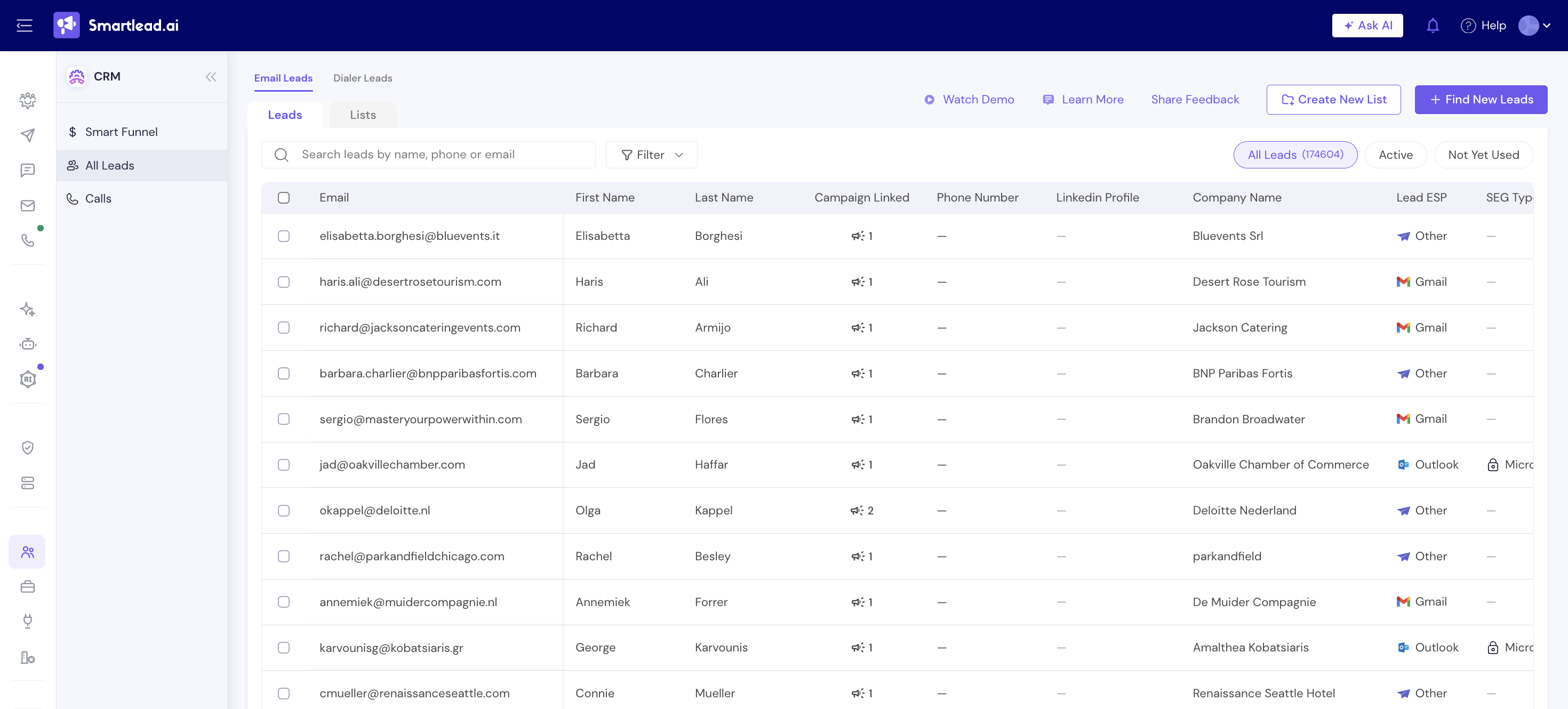
What You’ll See
Email Leads / Dialer Leads tabs: Email Leads covers leads contacted through your campaigns; Dialer Leads covers leads uploaded for calling through SmartDialer
Leads / Lists sub-tabs: Leads shows every individual lead; Lists shows the saved lead lists you’ve created
Search and Filter: Search leads by name, phone, or email, or use the Filter button to narrow by other fields
All Leads / Active / Not Yet Used: Toggle between your full lead count and leads that have or haven’t been used in a campaign yet
Create New List: Save a set of leads as a named list for reuse
Find New Leads: Jump into Smartlead’s lead search to add new leads to your account (this will take you to SmartProspect)
Note: Calling features live in SmartDialer, a dedicated workspace for outbound calls - see the SmartDialer help section for call logs, dialing, and voicemail drop.